Difference Between Hardware and Software in Computers
Published: 6 Nov 2025
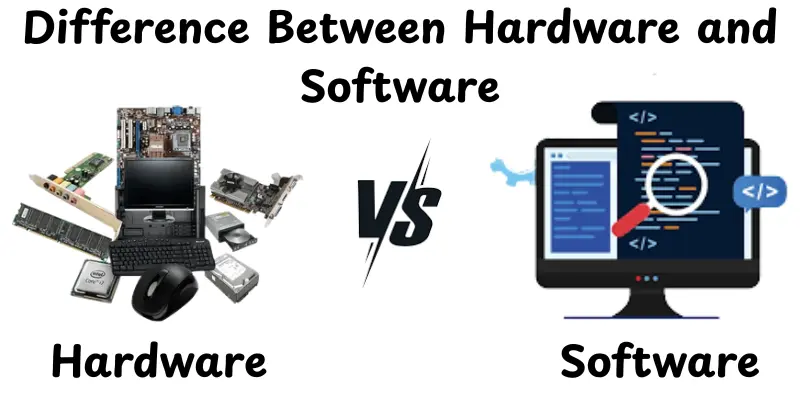
Have you ever wondered what really makes your computer or phone function? The parts you can touch or the programs that you use on every day? That’s where the software and hardware comparison comes in. Hardware refers to a computer’s physical parts like the keyboard, mouse and screen but software refers to the digital programs that help those parts to work such as apps, games or your operating system. People commonly compare the two to better understand how they work to complete every task we make on a smartphone. In this article, we’ll look at their meanings, key differences, specific advantages and disadvantages and how they connect to one another. Let’s see which one fits you better.
Key Difference Between Hardware and Software
When we talk about computers, the two most often used terms are computer hardware and software. Many people are confused by how they differ and why both are necessary. In this part, we’ll explain the main difference between hardware and software:
- Ease of Use
- Features
- Pricing
- Performance
- Support
- Upgrades
- Dependence
- Modification
- Storage
- Durability
Ease of Use
When we talk about ease of use, we mean how easy it is for someone to use or interact with each. Hardware is typically simple, plug it in and it works. Software can be simple or complex, depending on the software and the user’s experience.
Hardware:
- Physical devices are often plug-and-play.
- Easy to use once installed.
- Requires minimal technical skills for basic operations.
Software:
- Can be complex depending on the program.
- Needs installation and occasional updates.
- Some programs require learning before use.
Features
Features explain what each option can do and how it benefits users. Hardware usually performs specific physical tasks but software provides a greater variety of functions that may be updated or changed. They work together to assess the capacity of your computer.
Hardware:
- Performs specific, physical tasks.
- Limited to built-in functions.
- Reliability depends on build quality.
Software:
- Offers diverse functions for various needs.
- Can be updated with new features.
- Allows customization to suit different tasks.
Pricing
Pricing shows how much it costs to buy and keep each option. Hardware is normally a one-time expense but software can be free, subscription-based or purchased once. Price consideration helps you to choose which option best matches your budget.
Hardware:
- One-time purchase cost.
- Higher-quality devices may cost more.
- Minimal additional cost unless upgrades are needed.
Software:
- Can be free, subscription-based, or one-time purchase.
- Premium software can be expensive.
- Maintenance may require updates or paid support.
Performance
Performance indicators how effectively each task is completed. Hardware speed is determined by parts like the CPU or RAM, but software performance depends on coding and system compatibility. Checking performance makes sure the system operates smoothly and properly.
Hardware:
- Provides speed and efficiency for physical operations.
- Dependent on specifications like CPU, RAM or storage.
Software:
- Speed and efficiency depend on coding and system compatibility.
- Performance can improve with updates.
Support
Support shows how easily users can get help when something goes wrong. Hardware often comes with warranties or service centers, but software may provide tutorials, forums or customer support. Good support makes sure issues are resolved fast and smoothly.
Hardware:
- Typically has manufacturer warranty and service.
- Easy to get replacement parts.
Software:
- Support may include forums, tutorials or official help.
- Some programs offer premium customer support.
Upgrades
Upgrades show how easy a system may improve or add new features over time. Hardware parts can need replacement, but software is often updated. Keeping up with the latest developments helps keep up best performance and security.
Hardware:
- Limited upgrades depending on design.
- Upgrading may require new devices or components.
Software:
- Can be updated regularly.
- Adds new features without replacing the whole system.
Dependence
Dependence informs us if a system can work on its own or needs other components. Hardware often needs software to do tasks, but software can’t work without hardware. Understanding this enables more effective device planning and use.
Hardware:
- Needs compatible software to operate fully.
- Cannot function alone for complex tasks.
Software:
- Requires hardware to run.
- Cannot exist without a physical device.
Modification
Modification looks at how much you can change or adjust a system to meet your needs. Hardware often allows for limited physical changes, but software provides greater options for settings and functions. This displays how flexible each choice is for different users.
Hardware:
- Limited customization, usually physical changes.
- Upgrades may require technical skill.
Software:
- Highly modifiable settings and interfaces.
- Users can adjust to suit their preferences.
Storage
Storage is about where and how data is kept for use. Hard drives or SSDs offer physical storage capacity, but software digitally stores and organizes data. Together, they make sure that information is stored and easily accessed when needed.
Hardware:
- Physical devices like hard drives or SSDs store data.
- Capacity depends on device size and type.
Software:
- Stores and organizes data digitally.
- May require hardware or cloud space to save files.
Durability
Durability indicates how long a device or program can last without failing. Hardware can wear out or get damaged physically, while software may become outdated or unsupported over time. Understanding durability helps you choose reliable tools for long-term use.
Hardware:
- Can last many years if handled well.
- Susceptible to physical damage or wear.
Software:
- Doesn’t wear out physically.
- Can become outdated or unsupported over time.
Comparison table between hardware and software
| Feature | Hardware | software |
| Ease of Use | Easy to use for beginners | May require technical skill |
| Features | Basic, essential tools | Advanced and customizable |
| Pricing | Affordable, low cost | Higher price, value depends on needs |
| Performance | Works reliably for daily tasks | High performance for heavy tasks |
| Support | Standard support available | Premium or specialized support |
| Upgrades | Limited upgrade options | Regular updates and upgrades |
| Dependence | Functions independently | Often depends on other systems |
| Modification | Minimal customization | Highly customizable |
| Storage | Basic storage capacity | Larger or expandable storage |
| Durability | Long-lasting, sturdy | May vary, depends on use |
How Hardware and Software Work Together
Hardware and software are like two sides of one coin, in that they work together to make a computer work. The actual parts are provided by hardware, while software controls the hardware’s functions. They work together to transform raw equipment into a working system able to perform tasks, running programs, and managing data.
- Hardware executes tasks: The CPU, memory and storage process instructions given by software.
- Software sends instructions: Operating systems, applications and programs guide hardware on what actions to perform.
- Communication happens constantly: Input devices like keyboards and mice send commands and output devices like monitors and printers display results.
- Performance depends on both: Powerful hardware and well-optimized software ensure smooth and fast operation.
- Updates and upgrades improve synergy: Updating software or upgrading hardware helps the system run efficiently and supports new features.
Which Is More Important?
It’s natural to ask which is more crucial, hardware or software. But both are necessary for a computer to work properly. Hardware provides the foundation, while software brings it to life. Without one, the other can’t work properly.
- Hardware without software: A powerful CPU, RAM and storage are useless without programs to run.
- Software without hardware: Applications and operating systems need physical components to execute commands.
- Balanced combination matters: The best performance comes when hardware is strong enough to support the software’s needs.
- Use case matters: For gamers, strong hardware may be more noticeable, while for office work, efficient software may matter more.
Conclusion
In this article, we looked at the differences between hardware and software in terms of features, performance, cost and use. Hardware refers to the physical components of a computer but software covers the programs that operate on it. Both work together, with each providing highly to the function and speed of your system.Now that you’ve discovered the key differences, select the one that best meets your needs.
FAQs
Hardware is the physical parts of a computer you can touch, like the keyboard or monitor. Software is the programs and applications that run on hardware, like Word or a web browser. Hardware needs software to work and software needs hardware to run.
Five hardware examples: keyboard, mouse, monitor, CPU, printer.
Five software examples: Microsoft Word, Chrome browser, Photoshop, Zoom, Windows OS.
A device is a physical piece of equipment, like a laptop or printer. Software is a program that tells the device what to do, like apps or operating systems. Devices rely on software to perform tasks.
A laptop is hardware because it is a physical machine you can touch. The programs running on it, like apps and the operating system are software.
Generally, hardware tends to cost more because it involves physical parts and manufacturing.Software can also be expensive, especially premium versions or subscriptions, but often it has lower upfront cost compared to major hardware purchases.
Yes, they depend on each other. Hardware needs software to function properly, and software needs hardware to run.Together they allow a computer system to perform tasks, store data, and run applications.




- Be Respectful
- Stay Relevant
- Stay Positive
- True Feedback
- Encourage Discussion
- Avoid Spamming
- No Fake News
- Don't Copy-Paste
- No Personal Attacks
- Be Respectful
- Stay Relevant
- Stay Positive
- True Feedback
- Encourage Discussion
- Avoid Spamming
- No Fake News
- Don't Copy-Paste
- No Personal Attacks
