Advantages and Disadvantages of Laptops: A Comprehensive Guide
Published: 8 Jan 2026
In today’s digital world, laptops are essential tools for many people across the world. Every year, over 200 million laptops are bought, serving purposes like study, work, drawing, and watching movies. While these machines offer numerous advantages such as portability and versatility, they also have their disadvantages. Issues like limited upgrade options, security risks, and physical strain are common drawbacks.In this guide, we’ll walk you through the advantages and disadvantages of laptops so you can make an informed decision. Whether you’re looking for portability, power, or something else, we’ll cover what matters most to help you choose the best option for your needs.
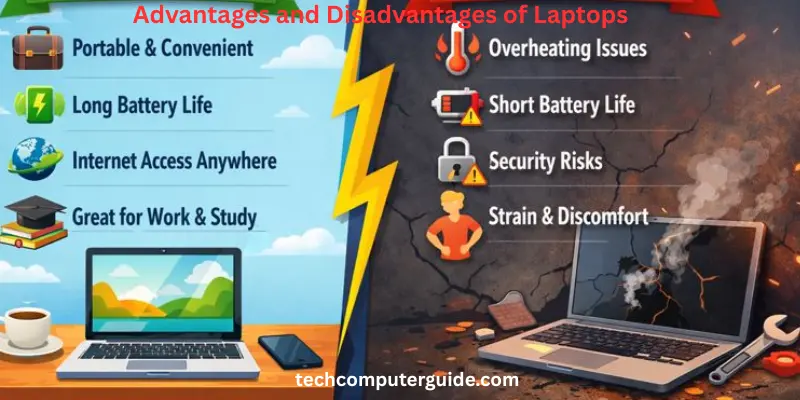
Advantages of Laptops
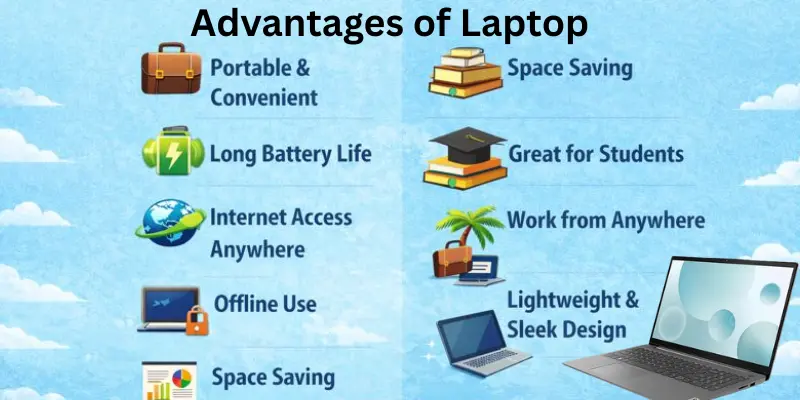
Laptops offer benefits that make life much easier, allowing us to work, study, and enjoy fun activities anytime and anywhere. Here are some main advantages of laptop:
- Mobility
- Finished product
- Internet access
- Offline operation
- Instant
- Portability
- Space-Saving
- Power Efficient
- Built-in Features
- Work from Anywhere
- Good for Students
- Lightweight & Sleek Design
- Online Communication
- Battery backup
- Wi-Fi and Bluetooth
- High security
Mobility
One of the key advantages of a laptop over a stationary computer is its mobility. With its lightweight design and compact size, a laptop can easily be moved from place to place, whether it’s to the office, a park, or even a cafe. Thanks to its built-in battery, you don’t need to worry about being near a power outlet—whether you’re carting it around in a car or simply using it at home, it offers the freedom to work or relax anywhere. Multiple models make it easy to choose the right one based on your specific needs, ensuring convenience wherever you are.
Finished product
The laptop stands out as the ultimate straightforward solution for anyone looking for efficiency and convenience. There’s no need for additional devices because it comes with everything you need: a keyboard, built-in mouse (or touchpad), speakers, microphone, and camera—all built-in for ease of use. With everything integrated into one sleek package, it’s the perfect finished product for those who want it all in one device.
Internet access
One of the most significant advantages of using a laptop is the seamless internet access it provides. The demand for constant connectivity has led to laptops being equipped with the power to easily connect to the web through wireless technology like Wi-Fi. Whether you’re working remotely, attending virtual meetings, or simply browsing, the ability to stay connected virtually anywhere is one of the key features that make laptops so essential.
Offline operation
One of the convenient features of a laptop is its ability to work offline, making it less dependent on continuous technical equipment or an internet connection. Whether you’re preparing presentations or reviewing work, you can easily use your laptop without needing to connect to mains or Wi-Fi. The battery life allows you to operate smoothly at various venues, providing the freedom to work without limitations.
Instant
One of the key advantages of a laptop is the instant access it provides to information. Whether you’re carrying it for personal use or professional tasks, the convenience of retrieving data and getting quick results is invaluable. This ability enhances better collaboration with co-workers in business environments, while for students, it enables fast research and learning, essentially becoming a ticket to endless opportunities.
Portability
A laptop stands out for its portability, making it easy to carry from one place to another. Whether you’re heading to school, the office, or traveling, its small size and light weight ensure it fits easily into a bag. As a portable computer, it offers unparalleled convenience, allowing you to work or study no matter where you are.
Space-Saving
A laptop is the perfect solution for those who need to save space. Unlike traditional computers that require a big table and separate parts, everything is integrated inside one body, making it compact and convenient. You can easily use it on a bed, sofa, or even your lap, which saves valuable space at home or school without compromising on functionality.
Power Efficient
A laptop is a highly power-efficient device compared to a traditional desktop computer, using much less electricity to perform the same tasks. The low power consumption helps reduce your electricity bill, and its battery also allows you to work without constantly relying on a power source. As a result, a laptop saves both energy and money, making it one of the most power-efficient devices available today.
Built-in Features
One of the key advantages of a laptop is its built-in features, which eliminate the need for extra devices. The screen, keyboard, mouse pad, speakers, and camera are all integrated seamlessly into the body of the laptop, making it incredibly easy to set up and start using right away. With these essential parts already built-in, you’re always ready to go without the hassle of connecting external accessories.
Work from Anywhere
A laptop offers the ultimate freedom to work or study from anywhere—whether that’s at home, school, the park, or even while traveling. Unlike traditional setups that are confined to a fixed spot, a laptop allows you to stay productive in any location, providing the comfort of working or learning on your terms. This flexibility is a game-changer, making it easier than ever to balance work and personal life.
Good for Students
A laptop is a perfect tool for students, making it easier to read books, complete homework, and watch learning videos from the comfort of home or school. With the ability to attend online classes and carry everything in one device, learning becomes more simple and accessible. It turns education into an engaging and fun experience, allowing students to seamlessly switch between studying and other activities.
Lightweight & Sleek Design
The laptop is designed with a lightweight and sleek design, making it incredibly smart and easy to carry in a bag or even by hand. Its thin body ensures that it’s not heavy, so you can take it with you wherever you go. The modern and stylish look of a laptop makes it a favorite for people who enjoy using a device that’s both functional and visually appealing.
Online Communication
With a laptop, you can easily communicate with anyone, whether it’s through video calls, chats, or attending online classes and meetings. The built-in camera and microphone ensure you stay connected to family, friends, and colleagues from anywhere. This ability to stay in touch, no matter the distance, is one of the key advantages that laptops offer, making communication more accessible than ever.
Battery backup
In underdeveloped countries or areas with frequent electricity problems, a laptop with strong battery backup becomes a lifesaver. Whether you’re doing computer activities, attending a video call with friends, or joining an online meeting with your boss, the laptop allows you to continue important work without worrying about power interruptions, even when you’re working from a garden or a remote village. Its battery plays an important role in ensuring that you stay connected, especially during electric load shedding.
Wi-Fi and Bluetooth
A laptop equipped with Wi-Fi and Bluetooth makes it incredibly versatile in terms of connectivity. Whether you’re at the university, office, or even in a store, bus station, or railway station, you can easily connect to the internet via Wi-Fi access. Additionally, Bluetooth allows you to pair your laptop with mobile devices and other accessories, making it simple to share data and exchange data efficiently. These features provide seamless communication and collaboration on the go.
High security
A laptop offers high security when you’re away from home, as it provides more control over who has access to your data. Unlike a desktop computer, which is often left in an open environment, a laptop can be easily secured in tight situations and kept near you, reducing the risk of security problems. You can ensure privacy by using passwords or biometric features to prevent anyone from gaining unauthorized access.
Disadvantages of Laptops
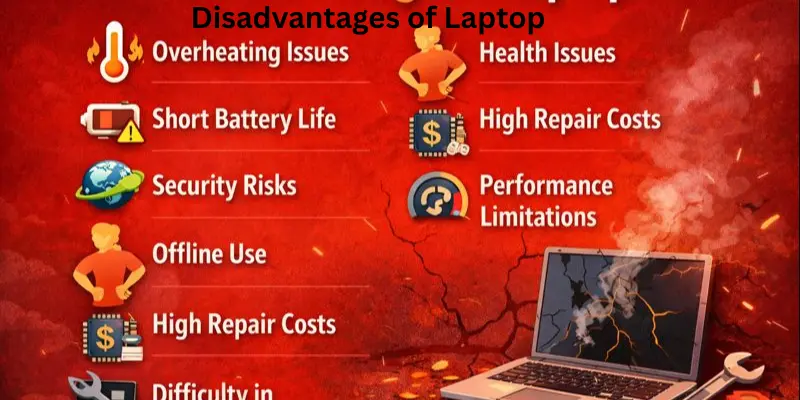
Laptops can be incredibly helpful, but it’s important to know that there are problems that might arise while using or even buying one. These are some disadvantages of laptop:
- Frequent Upgrades
- Higher price
- Difficulty in customization
- Highly insecure
- Health issues
- Durability
- Video Cards
- Overheating Issues
- Shorter Lifespan
- Battery Problems
- High Repair Costs
- Performance Limitations
- Typing Discomfort
- Wastage of time for students
- Slow Processor
- Screen size
Frequent Upgrades
One of the drawbacks of laptops is that frequent upgrades can be difficult, mainly due to their integrated design. Unlike desktops, where components like hard disc and memory are more accessible for replacement or upgrades, laptops often have proprietary designs that limit repair options. This construction can lead to high maintenance costs and make it challenging to keep up with the latest technology without buying a new laptop altogether.
Higher price
One of the disadvantages of laptops is that they tend to be costly, especially when compared to a traditional PC. The need for smaller components and the expensive technology required for their compact design often drives up the price, making laptops less affordable for some buyers. While they offer portability and convenience, these benefits come at a premium.
Difficulty in customization
A laptop is the limited ability for personalization to meet specific requirements. Upgrading memory, disk drive, processors, or graphics cards is challenging due to the compact design, which limits access to internal components. Unlike desktops, where you can easily replace parts, laptops often offer non-customization options, making it difficult to keep up with the latest technology. This can lead to the laptop becoming obsolete faster, requiring users to buy a new one instead of just opting for a replacement upgrade.
Highly insecure
Laptops are often considered insecure due to the risk of being stolen. The portability that makes them so convenient also makes them an easy target for thieves. Without adequate physical protection or safeguarding, both personal data and sensitive business data are vulnerable to misuse. This can lead to a heavy cost, especially if confidential knowledge is compromised, making it a dangerous situation for the owner.
Health issues
Prolonged use of laptops can lead to several health issues for users, especially with repetitive tasks. RSI (Repetitive Strain Injury) is common due to the flat keyboard, trackpad, and pointing devices that lack ergonomic support. The integrated screen can also force users into a hunch, causing strain on the neck and contributing to spinal injuries over time. To prevent these issues, users need a better view and regular breaks to maintain proper posture.
Durability
Despite the high portability of laptops, they are more susceptible to wear and tear compared to stationary devices. Common issues include the deterioration of components such as screen hinges, latches, and power jacks over time. Even with ordinary use, these parts can start to deteriorate, affecting the laptop’s overall performance and lifespan. This lack of durability makes laptops less reliable for long-term use without regular maintenance.
Video Cards
Unlike desktop computers, laptops often face limitations when it comes to video cards. These cards are generally less compatible with high-end gaming or graphic-intensive applications. Due to their smaller size and high power consumption, laptops are prone to permanent damage from overheating or excessive use. This can cause the laptop to run into issues over time, limiting its overall performance in demanding tasks.
Overheating Issues
One of the common disadvantages of laptops is their tendency to get hot after long use or many hours of activity. The laptop can become warm or even too hot to the touch, which is caused by the accumulation of heat inside the device. This can cause the laptop to slow down as its internal components struggle to function efficiently. Overheating can even lead to permanent damage, making it uncomfortable to use, especially during extended periods of time.
Shorter Lifespan
Laptops typically don’t last as long as other devices. After a few years of use, they are prone to stop working efficiently, especially if the battery becomes weak or breaks. The speed often slows down over time, making it frustrating to work on tasks. If a laptop is used too much, its lifespan is significantly reduced, meaning that many people are forced to replace their devices after just a few years, rather than enjoying them for many years.
Battery Problems
One of the biggest issues with laptops is battery problems. Over time, the battery may not function properly and could run out quickly or even stop charging altogether, making it hard to use without constantly plugging in to charge. A bad battery can make it difficult to work efficiently, and you may find yourself needing to charge it multiple times a day, which can be a hassle.
High Repair Costs
When a laptop breaks, the cost of fixing it can be expensive. Certain parts are hard to find or difficult to replace, and you often need a computer expert to handle the repair, making it a costly process. Unlike desktop computers, where parts are more easy to find and cheap to replace, laptop repairs can strain your budget.
Performance Limitations
Laptops are often less powerful than big computers, which makes them struggle with heavy software or big games. As a result, they may work slowly, stop, or even freeze when trying to handle big tasks, leading to frustration and wasted time. This limited performance can hinder productivity, especially for users who rely on their laptops for demanding projects.
Typing Discomfort
Laptop keyboards are often small and the keys are close together, making typing for extended periods of time difficult and uncomfortable. After a while, your fingers can get tired and even hurt, especially if you’re doing a lot of writing or schoolwork. Compared to a large keyboard, using a laptop can feel much less easier and more uncomfortable for those who type frequently.
Wastage of time for students
Laptops can lead to a waste of time for students, as they often get distracted by playing games on their notebooks. This results in their brain becoming unused, as they spend more time on brain-consuming entertainment than on academic tasks like calculation. Many students prefer to use notebooks for quick answers, which makes them lazy and wastes their precious time on unnecessary content rather than focusing on their studies.
Slow Processor
A laptop with a slow processor can be frustrating, especially when performing tasks that require high processing power. Notebooks often heat up quickly, causing the speed of the processor to decrease. Unlike a desktop computer, which has a larger fan that cools the system more efficiently, a laptop’s performance can lag during heavy computation, making it slower and less effective for intensive tasks.
Screen size
The screen size of a laptop can be a major limitation, especially when compared to larger desktop computers. With a small screen, typically between 13 inches and 17 inches, it can be difficult to have multiple windows open at once and properly manage them. In some cases, users may need to attach an extra monitor to work fast or to get a more comfortable viewing experience, something that’s not required with a desktop that has a larger monitor.
Conclusion
So guys, in this article, we’ve covered advantages and disadvantages of laptops in detail. Based on what we’ve discussed, I’d recommend considering what you primarily need your laptop for. If you’re always on the move or need something compact, a laptop is a great choice. However, if you’re looking for more power and customization, a desktop might be better. Make sure to think about your needs before making a decision.
FAQs about the advantages and disadvantages of laptops
Here are some of the most frequently asked questions about the advantages and disadvantages of laptops:
Laptops are incredibly valuable for students as they provide easy access to digital tools that enhance digital literacy, which is essential in today’s tech-driven world. In schools, they allow students to become proficient with software, improve computer skills, and conduct online research more efficiently. Collaborating with peers is also much easier, helping students work together on projects, make tech-driven decisions, and access the resources they need for success.
Laptops come with several disadvantages, such as limited upgrade options and overheating issues that can affect performance. The shorter lifespan of a laptop, especially with frequent battery problems, can lead to early repair costs. Eye strain from prolonged use, along with the risk of theft, adds to the concerns. Additionally, their performance limitations often make them less ideal for high-demand tasks compared to desktops.
When considering the RAM for a laptop, 16GB is ideal for most users, allowing it to work perfectly for day-to-day tasks like web browsing and word processing. However, for basic tasks, 4GB of RAM may suffice. If you’re working with more intense programs or advanced activities like photo editing or streaming video, you might want to opt for more RAM to ensure smooth performance.
Laptops can get hot when they are used for extended hours or heavy work. The small size of laptops means they often have fans inside, but these might not be enough to cool down the system effectively. Using a cooling pad can help regulate the temperature, but prolonged usage can still lead to overheating issues.
Laptops typically last between 3 years to 5 years, but this can vary depending on how much they are used and how well they are cared for. With good care, they can last longer, but heavy usage or lack of proper maintenance may shorten their lifespan.
Upgrading laptops can be harder compared to desktops due to their small size and fixed design. While you can attempt upgrades like adding memory, many parts are harder to change or replace, making it more complicated than upgrading a desktop where components are more easily accessible.
Staring at a laptop screen for long periods can definitely hurt your eyes. Without taking regular breaks or blinking enough, the strain can worsen. To help protect your eyes, it’s important to use eye protection like glasses or screen filters, especially if you’re using the laptop for extended hours.
Before you buy a laptop, make sure to consider battery life, storage, speed, and weight based on your needs—whether it’s for studying, playing games, or office work. It’s also important to check if you’re purchasing from a trusted shop to avoid any potential issues with the product.




- Be Respectful
- Stay Relevant
- Stay Positive
- True Feedback
- Encourage Discussion
- Avoid Spamming
- No Fake News
- Don't Copy-Paste
- No Personal Attacks
- Be Respectful
- Stay Relevant
- Stay Positive
- True Feedback
- Encourage Discussion
- Avoid Spamming
- No Fake News
- Don't Copy-Paste
- No Personal Attacks
