What is a Light Pen Computer? A Complete Guide
Published: 30 Jan 2026
The light pen computer is a unique input device that revolutionized the way users interact with computer screens. Initially developed in the 1950s, it works by detecting light emitted from a CRT monitor to pinpoint the pen’s location, making it an essential tool for tasks like drawing on screen and text editing.
As a light-sensitive device, the light pen allowed users to select objects, edit text, and even create detailed graphics directly on the display. While it has since been replaced by more modern technologies like touchscreens and styluses, the light pen played a pivotal role in the development of early interactive technology.
This article explores the fascinating history, uses, and technology behind the light pen, highlighting its lasting impact on today’s input devices.
What is a Light Pen Computer?
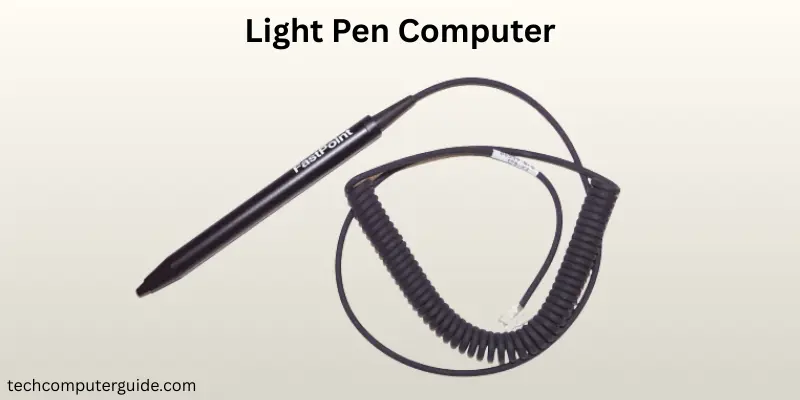
A light pen computer is a type of pointing device that allows you to interact with your computer screen. It works by detecting light emitted from the CRT monitor. This light-sensitive device uses sensors to identify the pen’s position on the screen, allowing users to select items or draw directly on the display. Unlike a mouse or keyboard, the light pen was specifically designed to work with CRT monitors and was essential for early digital art creation and text editing.
It is useful an electronic input device with a digital pen tip that interacts with screen interaction technology. When the light pen touches the screen, its sensors detect the light from the CRT monitor, and the computer registers the location of the pen. The light pen was a significant advancement before modern touchscreen devices and is still important for understanding the evolution of input technology.
The History of the Light Pen computer
The light pen computer has an interesting history of light pen development. It was first introduced in the 1950s, during the early days of interactive technology. The concept of the light pen was born at the Massachusetts Institute of Technology (MIT) as part of the Whirlwind project.
Invented by Ben Gurley in 1959, the light pen computer was initially used as a tool for interacting with CRT monitors in military and industrial applications. It allowed users to select points or edit text on the screen in real-time.
The light pen became widely used during the 1960s, primarily for text editing devices and early graphics design tools. By the 1980s, it had evolved to work with specialized systems in fields like music workstations and digital art creation. Over time, the light pen lost popularity as more advanced devices, like the mouse and touchscreens, became common.
The Basic Principle of How a Light Pen Works
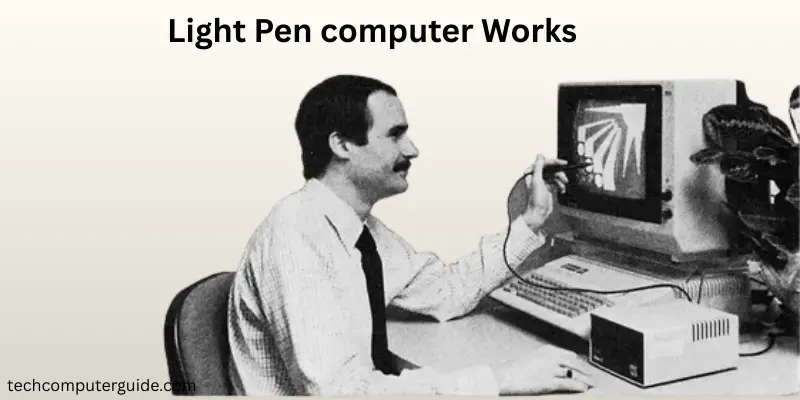
The light pen operates on a simple yet clever principle. Inside the pen, there is a light-sensitive device that detects light from the CRT monitor. When the light pen touches the screen, its sensors react to the light emitted from the monitor, allowing the computer to detect the pen’s position.
This interaction is what makes the light pen computer a unique input device for tasks like drawing on screen or selecting text.
The light pen is an useful tool for those working in fields where precise interaction with a computer screen is necessary. It can be used to highlight text, create detailed drawings, or interact with graphics design tools.
By tracking light patterns on the screen, it provides users with an intuitive way to engage with their digital environment, making it a precursor to modern touchscreen technology.
Key Features and Components of a Light Pen
The light pen computer is a sophisticated device with several key features that contribute to its functionality. Understanding these components helps to appreciate how it revolutionized interactive technology and contributed to early digital art creation and text editing. Here are the useful parts that make the light pen work:
- Photocell (Light Sensor): The tip of the light pen contains a photocell that detects the light emitted by the CRT monitor, allowing the pen to track its position on the screen.
- Button or Trigger: Similar to a mouse, the light pen includes a button that can be pressed to select or interact with items on the screen.
- Connection Mechanism: Some light pens are corded, connecting directly to the computer with a cable, while others are battery-powered for more flexibility and mobility.
- Light Pen Tip: The design of the tip ensures accurate tracking of the light pen on the CRT monitor, providing smooth interaction.
- Ergonomic Design: The light pen is designed to be comfortable to hold, making it easier to use for extended periods, especially in tasks like drawing on screen or editing text.
Types of Light Pens: Which One is Right for You?
There are several types of light pens designed for different uses.
Corded light pens were the first type and are still used in some industrial settings. These pens have a direct connection to the computer and do not require batteries. They are reliable but offer limited mobility.
On the other hand, battery-powered light pens are more versatile and portable. These light pens allow users to work without being tethered to a computer, making them ideal for environments where mobility is essential.
LED light pens are another modern variation. These pens use LED lights to interact with computer screens and are often used for digital art creation and image highlighting. They provide greater precision and are widely compatible with newer display technologies like LCD screens.
Choosing the right type of light pen depends on your specific needs, whether you need a simple drawing tool or a more advanced option for professional design work.
Applications of Light Pens
The light pen computer has been used in a variety of applications.
In the early days of graphics design, the light pen was essential for digital art creation and image highlighting. It allowed artists and designers to draw directly on the screen, making it easier to create and edit detailed images.
The light pen was also used in PowerPoint presentations and interactive systems, where it helped presenters highlight or select items on the screen during a talk.
Other applications included text editing and data entry systems, where the light pen enabled users to select and edit text with great precision.
Although it is no longer commonly used, the light pen was an important part of screen interaction technology and influenced the development of later input devices.
Advantages of Using a Light Pen Computer
In this section, we will look at the pros and cons of a light pen computer. While it offers many benefits, it also comes with certain drawbacks.
| Advantages of a Light Pen Computer |
|---|
|
| Disadvantages a Light Pen Computer |
|---|
|
Light Pens vs Modern Input Devices
When comparing the light pen to modern input devices, such as the mouse and touchscreen, there are some clear differences.
The light pen offers precision and is ideal for tasks like drawing on screen or editing text. However, modern devices like the mouse have largely replaced the light pen because they are more compatible with modern screens and are easier to use for everyday tasks.
While touchscreens offer a similar experience to the light pen, they allow for direct interaction without the need for a physical tool.
The light pen, on the other hand, requires a specific CRT monitor and is less flexible than a touchscreen.
Despite this, the light pen laid the groundwork for the interactive technology we use today.
Here is a comparison table between Light Pens and Modern Input Devices:
| Feature | Light Pen | Modern Input Devices (Mouse, Touchscreen, Stylus) |
| Precision | Offers high precision for drawing on screen and text editing | High precision, especially with touchscreens and stylus, but varies by device |
| Ease of Use | More intuitive for direct screen interaction | Easy to use, but requires different gestures or movements (clicking, dragging, tapping) |
| Compatibility | Works best with CRT monitors, not suitable for LCD or touchscreen displays | Compatible with LCD, LED, and touchscreen displays |
| Durability | Can be fragile and prone to damage | Mouse and stylus are generally more durable; touchscreens are built for frequent use |
| Mobility | Corded models restrict movement; battery-powered models offer some freedom | Mouse is stationary, while touchscreens and stylus offer mobility |
| Usage Context | Primarily used for drawing, graphics design, and text detection | Used for a wide range of activities like browsing, gaming, and professional work |
| Ergonomics | Comfortable for drawing and text editing for extended periods | Ergonomically designed, especially for styluses and touchscreens |
| Modern Applications | Limited to niche fields like graphic design and early tech | Ubiquitous in everyday tasks, from browsing to professional work in design, gaming, and more |
| Price | Relatively affordable but less available today | Widely available with a variety of price points depending on the device |
| Technological Evolution | Largely outdated, replaced by styluses and touchscreen technology | Constantly evolving with touchscreens, smart devices, and advanced gesture controls |
The Legacy of the Light Pen: Where is it Now?
Today, the light pen computer is mostly obsolete, replaced by more modern technologies like touchscreens and styluses. However, its legacy still lives on in these devices. The light pen helped pave the way for modern interactive technology, and its design principles continue to influence the development of user interface tools. The light pen showed the potential for direct interaction with computer screens, a feature that is now common in modern devices.
Though it is no longer widely used, the light pen remains an important milestone in the history of input devices. Its development helped set the stage for innovations like the stylus and touchscreen, which are now an integral part of how we interact with technology today.
Conclusion
The light pen computer was a revolutionary input device that helped shape the way we interact with computer screens today. Though it has largely been replaced by newer technologies, its impact on screen interaction technology and digital art creation is undeniable. From its humble beginnings in the 1950s to its use in graphic design and PowerPoint presentations, the light pen played a crucial role in the evolution of interactive technology. While it may not be as common today, its legacy continues to influence modern user interface tools.
FAQs about Light Pen Computer
A light pen is a device used to interact with a computer screen. It works by detecting light emitted from a CRT monitor. Users can point, select, or draw directly on the screen with the pen, just like a digital pen.
No, a light pen is different from a mouse. While both are input devices, a mouse moves a cursor on the screen by physical movement, while a light pen detects light on the screen to pinpoint its position and allows direct interaction.
The light pen uses a light-sensitive sensor at the tip to detect light from the screen. When the pen touches the CRT monitor, the computer detects its position and registers the input. This allows users to select or draw on the screen.
Yes, a light pen is considered a digital tool. It interacts with digital screens to allow users to perform tasks like drawing, text editing, or selecting items, much like a stylus or mouse.
No, a light pen works primarily with CRT monitors. It doesn’t function well with modern LCD or touchscreen displays, as it relies on detecting light from the specific type of screen technology used in CRT monitors.
The control point on a light pen refers to the position it detects on the screen. The accuracy of scanning is directly related to how precisely the pen can identify this point. The more accurately the pen detects the position, the clearer and more detailed the input will be.
Modern examples of digital light pens include styluses used on touchscreen devices. Graphics tablets and tools like the Wacom tablet also use similar technology for digital art creation and precise drawing on screens.
A digital light pen is a device used to interact with a computer screen through light detection. It is an evolution of the traditional light pen and works with modern screens, often used for detailed graphic design or drawing tasks.
A light pen has a few major components: a photocell at the tip to detect light, a button to select or perform actions, and a connection mechanism (either corded or battery-powered) to communicate with the computer’s screen.
Unacademy is a learning platform that provides various courses and preparation materials for competitive exams like the Bank Exam. It offers expert guidance, interactive sessions, and practice tests to help students prepare effectively for their exams.





- Be Respectful
- Stay Relevant
- Stay Positive
- True Feedback
- Encourage Discussion
- Avoid Spamming
- No Fake News
- Don't Copy-Paste
- No Personal Attacks
- Be Respectful
- Stay Relevant
- Stay Positive
- True Feedback
- Encourage Discussion
- Avoid Spamming
- No Fake News
- Don't Copy-Paste
- No Personal Attacks
