Secondary Storage Devices Explained: Everything You Need to Know
Published: 8 Nov 2025
Ever saved an important file and later couldn’t find where it went? It’s a common error that has many people asking how computers actually keep their data safe.Don’t worry, this article will clarify things. We’ll talk about all you need to know about secondary storage devices like their features, types, advantages and how they make your digital life easier and more organized.

What Are Secondary Storage Devices?
Secondary storage devices are tools that allow a computer to keep data over a longer period of time.They protect information even when the computer is turned off. These devices store large amounts of data like images, movies, games and papers.Common examples are hard disks, solid-state drives, USB flash drives and CDs. They work as a backup for important files that you don’t want to lose.Basically, they are the computer’s long-term memory.
Importance of Secondary Storage Devices
Secondary storage devices are very important for all computer users.They protect your data and make sure you have access to it at any time.These devices store files that are too large or too many for the computer’s main memory.
- They provide long-term storage for all types of files.
- They allow you to backup important data easily.
- They help free up space on your computer’s main memory.
- They make it simple to share and transfer files between devices.
- They improve data safety by keeping information secure from accidental loss.
Working of Secondary Storage Devices
Secondary storage devices enable computers to save and recover data when needed.They save data permanently, even when the computer is shut off.Understanding how they function can help you pick the best device for your needs.
- Data is written to the device using magnetic patterns, electrical signals or laser technology.
- The device stores the data in memory cells, disks or cloud servers depending on the type.
- When you need a file, the device reads the stored data and sends it back to the computer.
- Some devices like SSDs work faster because they have no moving parts.
- Hard drives use spinning disks and a read/write head to access and save data.
- Cloud storage sends data over the internet to remote servers for safe keeping.

Key Features of Secondary Storage
Secondary storage devices have many key features that make them helpful in common computing.These features improve data storage, protection and access efficiency.
- Non-volatile memory- Data remains safe even when the computer is turned off.
- High storage capacity- They can hold large amounts of files, videos and applications.
- Portability- Some devices like USB drives and external SSDs are easy to carry.
- Durability- Many devices are built to last and resist wear and tear.
- Affordability- They provide a cost-effective way to store large amounts of data.
Types of Secondary Storage Devices
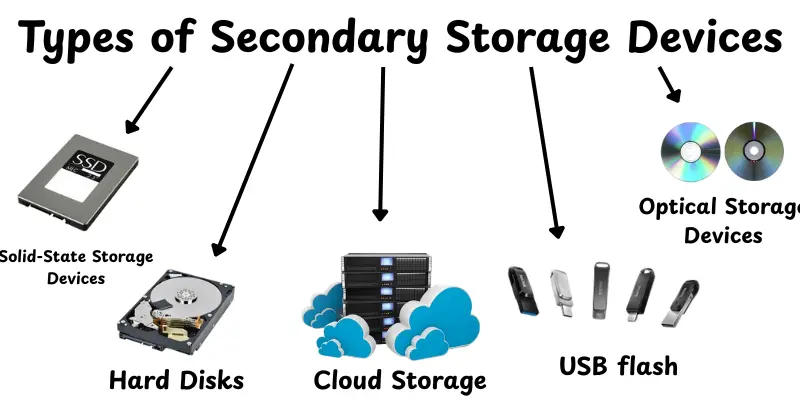
Secondary storage devices are available in many different types of shapes to simplify data storage and access.Each type works independently and performs a different purpose.Here are the main types:
- Magnetic Storage Devices- Use magnetic patterns to save data like hard drives and tapes.
- Optical Storage Devices- Use lasers to read and write data on discs like CDs and DVDs.
- Solid-State Storage Devices- Store data in flash memory without moving parts like SSDs and USB drives.
- Cloud Storage- Saves data on online servers, accessible from anywhere with the internet.
Applications of Secondary Storage Devices
Secondary storage devices are used in many different types of uses, both personal and professional.They provide fast storage, management and access to large amounts of data. Here are the main applications:
- Data Backup: Keep important files safe in case of computer failure.
- File Storage: Store documents, photos, videos and software.
- Media Storage: Save movies, music and games for easy access.
- Data Transfer: Move files between computers or devices easily.
- Business Use: Store large amounts of company data and records.
- Cloud Services: Access and store files online for convenience.
- Archiving: Keep old files and records for future reference.
Advantages and Disadvantages of Secondary Storage Devices
Secondary storage devices are necessary for data backup and management.They give multiple advantages, but they also have some disadvantages that users should be careful of.
| Advantages |
|---|
|
| Disadvantages |
|---|
|
How to Choose the Right Secondary Storage Device
Choosing the right secondary storage device can have a major effect how you save and access your data.The best option depends on your requirements, budget and the type of data you work with.Here are some easy tips to help you decide:
- Consider storage capacity- Choose a device that can hold all your files and leave room for future data.
- Check speed- SSDs are faster than HDDs, which is important for games or large files.
- Think about portability- If you need to carry data, use USB drives, memory cards or external SSDs.
- Look at durability- Some devices last longer and resist damage better than others.
- Compare costs- Balance your budget with the storage size and type you need.
- Decide on usage- HDDs or cloud storage are ideal for backups, but SSDs are better in terms of speed.
- Consider accessibility- Cloud storage is great if you want to access files from anywhere.
- Check compatibility- Make sure the device works with your computer or other gadgets.
Future of Secondary Storage
Secondary storage options are becoming faster, more dependable and smarter.Technology continues to improve how we keep and access data, making it easier for both personal and professional use.
- NVMe SSDs: Faster and more efficient than traditional SSDs and HDDs.
- Hybrid storage systems: Combine SSD speed with HDD capacity for better performance.
- Cloud integration: More data will be stored and accessed online seamlessly.
- Increased storage density: Smaller devices will hold larger amounts of data.
- Energy-efficient devices: Future storage will consume less power.
- Improved durability: Devices will last longer and resist damage better.
- AI-assisted storage management: Smart systems will organize and retrieve files automatically.
- Portable high-capacity devices: Compact drives with huge storage will become common.
- Affordable large storage: Cost per gigabyte will continue to decrease.
- Secure storage solutions: Advanced security will protect data from theft or loss.
Conclusion
In this article, we’ve covered everything about secondary storage devices, including their types, features, uses, benefits, drawbacks and how to choose the best one.These devices have importance for keeping your data secure, organized and quickly available.Personally, I recommend buying a storage device that meets your demands and budget while giving capacity for future data.It could make a major difference in your digital life.So, continue to explore your options and learn about the best ways to protect your data!
FAQs
Secondary storage devices are tools for permanently storing data.They keep files safe even when the computer is switched off.Hard disks, solid-state drives, USB drives and CDs are some examples.
Primary storage is the computer’s main memory, similar to RAM, which is used for quick access when executing programs.Secondary storage is used to store files and data over an extended period of time.Primary is quick but only for a short time, while secondary is slower but permanent.
Secondary memory is permanent storage where data is saved for the long term.Examples include hard disk drives (HDD), solid-state drives (SSD), USB flash drives, CDs, DVDs, Blu-rays, memory cards, magnetic tapes, external hard drives and cloud storage.
They allow you to save extra copies of your files so you won’t lose them if your computer fails.This keeps important documents, photos or work safe.You can use them to restore your files when something goes wrong.
They save up space in your computer’s main memory by keeping less often used data.This makes your system operate quicker and smoother.This is because the computer does not have to handle too many files at once.
Yes, they are made to keep data for a long time even when the computer is turned off.You can store old projects, photos or videos there.This means you don’t have to delete older files that could still be useful.
Yes, they often provide more storage per cost than main memory or frequent replacements. This makes them a good option if you have a lot of data.You can store a large number of files without paying large expenses.
Absolutely. They give you an option to store data off your main system, which protects you if the main system fails or gets infected.Having a backup helps you recover faster.They act like a safety net for your digital stuff.




- Be Respectful
- Stay Relevant
- Stay Positive
- True Feedback
- Encourage Discussion
- Avoid Spamming
- No Fake News
- Don't Copy-Paste
- No Personal Attacks
- Be Respectful
- Stay Relevant
- Stay Positive
- True Feedback
- Encourage Discussion
- Avoid Spamming
- No Fake News
- Don't Copy-Paste
- No Personal Attacks
