What Is an AZERTY Keyboard? Everything You Need to Know
Published: 31 Jan 2026
The AZERTY keyboard is a popular layout primarily used in French-speaking countries, including France and Belgium. Designed specifically to accommodate the needs of French typists, this layout differs significantly from the more common QWERTY keyboard. It provides easier access to essential French accents like é, è, and ç, which are integral to the language.
While it is widely adopted in French regions, its use can be confusing for those accustomed to QWERTY. In this article, we’ll explore the history, design, and advantages of the AZERTY keyboard, and compare it to QWERTY, offering a comprehensive guide to understanding its features and unique benefits.
What Is an AZERTY Keyboard?
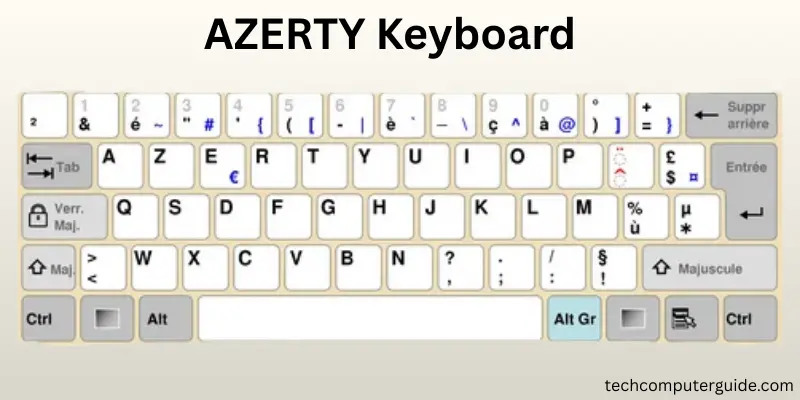
The AZERTY keyboard layout is a variation of the more common QWERTY keyboard. It is primarily used in countries where French is the main language, such as France and Belgium. The name AZERTY comes from the first six letters on the top row: A, Z, E, R, T, Y. Unlike QWERTY, the AZERTY layout is tailored to help users type French characters like é, è, and ç more easily. It has a unique arrangement of keys to accommodate the specific needs of French typing.
The AZERTY layout was created to make it more efficient to type in French. This layout helps French speakers access commonly used French letters and symbols quickly. Unlike QWERTY, which was designed for English speakers, AZERTY aims to make typing in French much more comfortable by placing special characters and accents in convenient spots.
History of the AZERTY Keyboard
The AZERTY keyboard has a rich history tied to the evolution of typing in French-speaking countries. Created to address the unique needs of French typists, it became the standard layout in regions like France and Belgium. Below are the key milestones in the development of the AZERTY keyboard:
- Early 1900s: The QWERTY layout was the dominant design, primarily used for English typing.
- French Typing Challenges: French typists faced difficulty typing French accents like é and ç on QWERTY keyboards.
- Redesign of Keyboard: Engineers in France redesigned the layout to make it easier for French typists to access special characters.
- Early 20th Century: This keyboard was introduced as the solution for French language typing.
- Widespread Adoption: By the 1920s, the AZERTY layout replaced QWERTY in France and Belgium and became the standard for French typing.
- Continued Use: Over time, AZERTY became widely adopted in schools, offices, and homes in French-speaking regions, where it is still used today.
Why Was the AZERTY Keyboard Designed?
The AZERTY keyboard layout was designed to meet the specific needs of French typing. Unlike the QWERTY layout, which was built for English, AZERTY places the most commonly used French letters and accents in easy-to-reach spots.
This includes keys for characters like é, à, and ç, which are not available on QWERTY keyboards. The main goal was to improve typing speed and accuracy for French speakers by providing quicker access to the symbols they use most often.
Additionally, the AZERTY keyboard was crafted to reduce typing errors and strain, particularly for French language typing. It made it easier to type French text in schools, businesses, and even for personal use.
With this layout, French speakers could type documents, emails, and other materials more efficiently, without the hassle of constantly switching between keys for accents.
Where Is the AZERTY Keyboard Used?
The AZERTY keyboard is a type of keyboard that is predominantly used in France and Belgium. It is also commonly found in Luxembourg and parts of Switzerland. In these countries, AZERTY is the standard layout used in schools, homes, and offices. Many French-speaking countries in Africa, such as Senegal, Ivory Coast, and Algeria, also use this layout due to the widespread use of French.
While AZERTY is mainly used in regions where French is the dominant language, it is not as common in other parts of the world. People who frequently travel or switch between regions using QWERTY may face challenges when using AZERTY keyboards outside of French-speaking countries.
Design and Layout of the AZERTY Keyboard
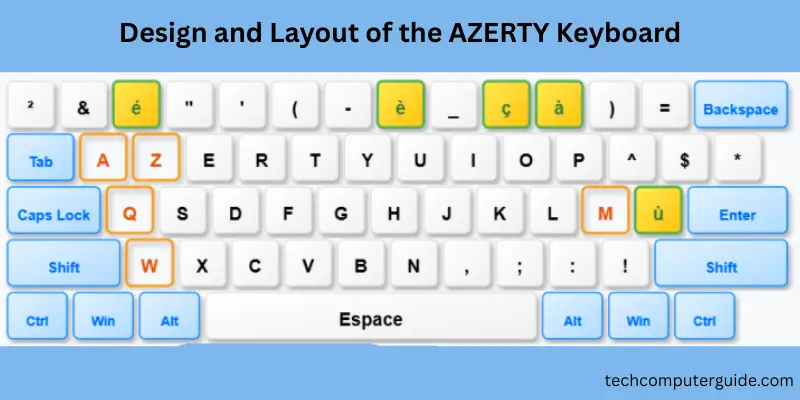
The AZERTY layout is designed to facilitate French typing. It differs from the QWERTY layout in several key ways. One of the most notable differences is the top row of letters, which starts with A, Z, E, R, T, Y, instead of the Q, W, E, R, T, Y arrangement seen in QWERTY keyboards. Additionally, the AZERTY keyboard includes dedicated keys for typing French accents such as é, è, à, and ç.
In terms of key placement, AZERTY rearranges some of the punctuation and special symbols. For example, symbols like @ or & may be located in different places, or you may need to press the Shift key to access them. This layout is designed to improve typing speed and accuracy for French speakers, but it can be confusing for those used to the QWERTY layout.
AZERTY vs. QWERTY: Key Differences
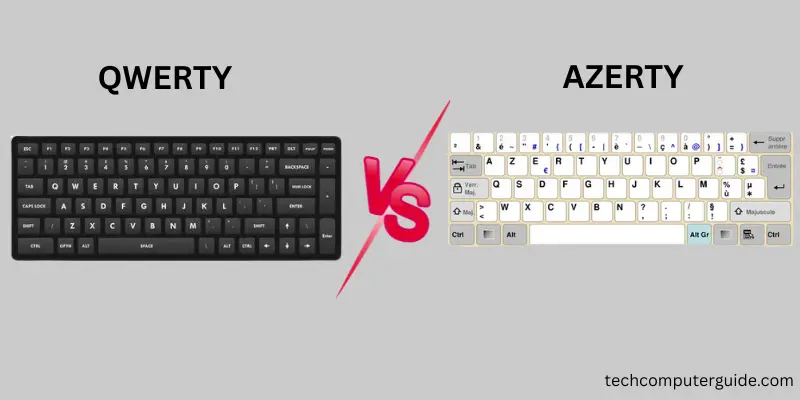
When comparing AZERTY and QWERTY, there are a few key differences that stand out. The most obvious difference is the arrangement of the letters.Here’s a comparison of AZERTY vs. QWERTY: Key Differences in a table format:
| Aspect | AZERTY Keyboard | QWERTY Keyboard |
| Letter Layout | Starts with A, Z, E, R, T, Y on the top row | Starts with Q, W, E, R, T, Y on the top row |
| French Accents | Easy access to é, è, à, ç and other French accents | Requires additional keystrokes or shortcuts for accents |
| Common Symbols | Symbols like @ and & require Shift or AltGr | Symbols like @ and & are easier to type |
| International Use | Primarily used in French-speaking countries | Widely used in English-speaking countries |
| Typing Speed | Faster for French typing due to easy access to French accents | Faster for English typing due to standard layout |
| Adaptation for Non-French Speakers | Can be difficult for QWERTY users to switch | Easier for French speakers switching from AZERTY |
| Programming | Less efficient for coding due to hard-to-reach symbols | Preferred for coding with easier access to coding symbols |
| Global Usage | Limited mostly to France, Belgium, and French-speaking countries | Universally adopted across most countries |
Advantages and Disadvantages of the AZERTY Keyboard
In this section, we will look at the pros and cons of using the AZERTY keyboard. Like any keyboard layout, it has its benefits and drawbacks. Understanding both sides will help you decide if it’s the right layout for your needs.
Advantages of the AZERTY Keyboard
The AZERTY keyboard is tailored to French typing, offering several benefits for French speakers and those typing in French regularly.
- Efficient for French language typing: Common French letters and accents are easily accessible.
- Improves typing speed: French accents like é, è, and ç are placed on convenient keys.
- Familiar to French speakers: Used widely in France, Belgium, and other French-speaking regions.
- Helps reduce typing errors: The layout is designed to prevent common mistakes in French writing.
- Preferred for French documents: Commonly used in schools, offices, and businesses in French-speaking countries.
Disadvantages of the AZERTY Keyboard
However, there are some challenges when using the AZERTY layout, especially for non-French speakers or those familiar with other layouts.
- Hard to switch from QWERTY: Users who are used to the QWERTY layout may find it difficult to adjust.
- Not globally recognized: It’s not as widely used outside of French-speaking countries, making international use challenging.
- Key placement differences: Certain symbols like @ and & are in different positions compared to QWERTY.
- Not ideal for gaming: Many games are designed for QWERTY layouts, making it harder to play without remapping keys.
- Limited for programming: Programming often requires symbols that are harder to type with AZERTY.
Who Should Use an AZERTY Keyboard?
The AZERTY keyboard is ideal for people who type regularly in French. If you live in a French-speaking country like France, Belgium, or parts of Africa, this layout can make your typing experience much faster and more comfortable. Students, writers, and office workers in these regions benefit greatly from the AZERTY layout.
However, if you frequently type in English or switch between languages, you may find the AZERTY layout a bit tricky to get used to. It may take some time to adjust if you are accustomed to QWERTY keyboards.
The Future of the AZERTY Layout
The AZERTY layout has been around for over a century and continues to be widely used in French-speaking countries.
However, with the rise of globalization and QWERTY dominance in many international settings, there are questions about whether AZERTY will continue to thrive in the digital age.
As technology continues to evolve, new keyboard layouts may emerge, but for now, AZERTY remains the go-to layout for French typing in regions where it is most commonly used.
As more people become accustomed to QWERTY and international keyboards, the AZERTY layout may see less use outside of French-speaking areas.
However, it will likely continue to serve as the primary keyboard layout in regions where French is spoken.
Conclusion
The AZERTY keyboard layout plays a vital role in French typing and remains an essential tool for those in French-speaking countries. While it has its limitations outside these regions, its design and arrangement of keys make it an excellent choice for French speakers. Whether you are a student, a content creator, or an office worker, the AZERTY keyboard helps you type efficiently and comfortably in French. As globalization continues to shape the tech world, it will be interesting to see how the AZERTY layout adapts and remains relevant in the future.
FAQs
The AZERTY keyboard is mainly used in France, Belgium, and parts of Luxembourg and Switzerland. It is also common in several French-speaking African countries such as Senegal and the Ivory Coast. These regions use AZERTY as the standard layout for typing in French.
While the AZERTY keyboard can be used for gaming, it’s not the best choice. Many games are designed with the QWERTY layout in mind, so you might need to customize the key bindings. Some gamers prefer QWERTY for its more familiar placement of keys like W, A, S, D for movement.
The AZERTY keyboard was created to better suit the French language, making it easier to type French letters and accents. It places commonly used French characters like é, à, and ç in more accessible spots. In contrast, QWERTY was designed for English, where those characters aren’t as frequently used.
The AZERTY keyboard is not an English keyboard layout. It is specifically designed for French typing. If you need an English keyboard, QWERTY is the standard in most English-speaking countries, including the USA and UK.
To type using an AZERTY keyboard, first, switch your device’s keyboard settings to the AZERTY layout. You’ll find that the top row of letters starts with A, Z, E, R, T, Y instead of Q, W, E, R, T, Y. To type French accents, use the corresponding keys, such as pressing the é key directly or using AltGr for special symbols.






- Be Respectful
- Stay Relevant
- Stay Positive
- True Feedback
- Encourage Discussion
- Avoid Spamming
- No Fake News
- Don't Copy-Paste
- No Personal Attacks
- Be Respectful
- Stay Relevant
- Stay Positive
- True Feedback
- Encourage Discussion
- Avoid Spamming
- No Fake News
- Don't Copy-Paste
- No Personal Attacks
