What Is Projector? Powerful Guide to Types, Uses, and Features
Published: 1 Dec 2025
Projectors are common in offices, schools and homes every day.People use them for work, learning and entertainment.Many people are still confused about how they work and which one to select. This guide covers everything in a straightforward and easy manner. We will discuss kinds, applications, main features and buying advice. By the end, what is projector will be plain and simple to understand.But projectors are also important output devices for computer systems because they display visual information from a computer on a big screen for easy viewing.
What is a Projector?
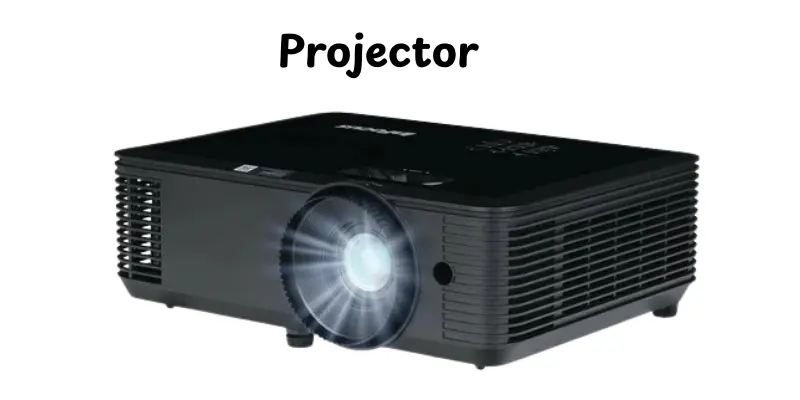
A projector is a device that show pictures or videos from a source on a flat surface. It employs light to show material in a bigger format. People connect it to a computer, phone, or media player to show. The image is shown on a wall or specific screen. This allows many people to see the same information at once. Projectors are used in various settings like schools, offices and homes.They improve the clarity of images, movies, and presentations.
History of Projectors
Projectors have changed more over time. Each new version made image display easier and clearer. This history shows how simple ideas grew into modern tools.
- 1600s: Early projectors used candles and glass slides to show images.
- 1800s: Magic lanterns became popular for public shows and learning.
- Early 1900s: Slide projectors appeared in schools and offices.
- Mid-1900s: Film projectors became common in cinemas and events.
- 1960s–1980s: Overhead projectors were widely used in classrooms.
- 1990s: Digital projectors started connecting with computers.
- 2000s: Home theater projectors gained popularity.
- Today: Modern projectors use LED and laser light for better quality.
How a Projector Works
A projector shows images onto a big area using light. It takes information from a device and displays it properly.The process is simple and easy to follow.
- The projector receives an image or video from a computer, phone or media player
- A strong light turns on inside the projector
- The light passes through the image data
- Lenses focus the light into a clear picture
- The image moves through the lens and reaches the wall or screen
- The picture appears larger and easy for everyone to see
Types of Projectors
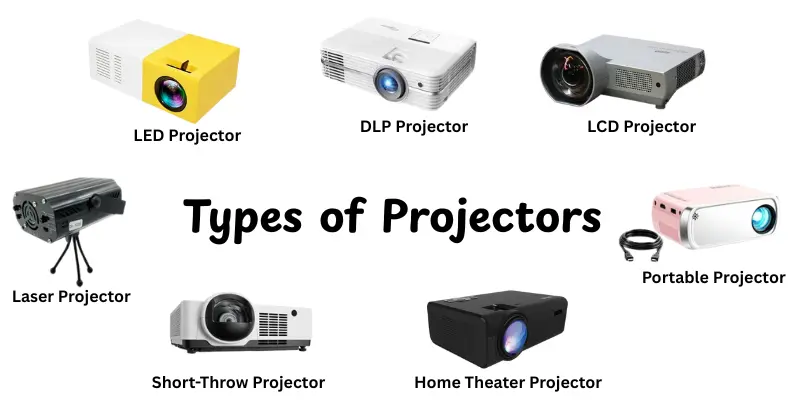
Projectors come in different types to fit different needs and places. Each type uses a special technology to show clear images. Here’s are some main types of projectors:
- LCD Projector: Uses liquid crystal displays to show bright and clear images.
- DLP Projector: Uses tiny mirrors to project smooth and sharp visuals.
- LED Projector: Uses LED lights for long-lasting and energy-efficient display.
- Laser Projector: Uses laser light for very bright and high-quality images.
- Short-Throw Projector: Can display huge pictures from a short distance.
- Portable Projector: Small and easy to carry for travel or outdoor use.
- Home Theater Projector: Designed for movies and entertainment at home.
- Business/Education Projector: Made for presentations and classroom use.
Parts of Projectors
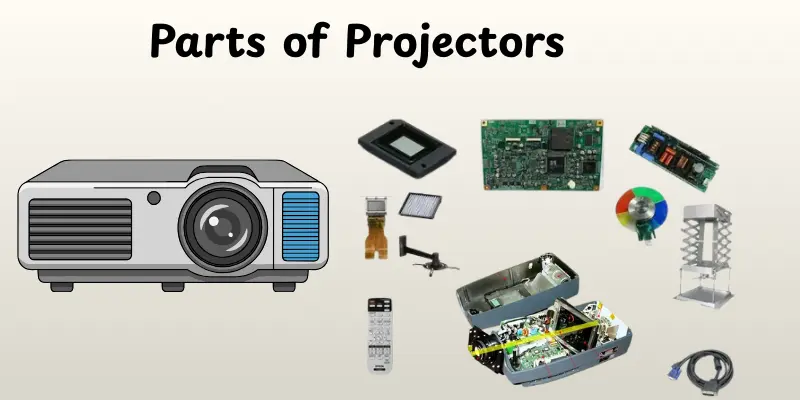
A projector has many important parts that work together to show images on a screenEach component plays an important function in focussing light and producing a clean image.Understanding these parts of the projector allows you to use and maintain a projector better.
- Light Source: Provides the brightness needed to display the image.
- Lens: Focused the light and displayed the picture on the screen.
- Prism or Mirrors: Directs light through the system to create the final image.
- LCD or DLP Chip: Processes the image to display it clearly.
- Cooling Fan: Keeps the projector from overheating during use.
- Input Ports: Allow devices like computers, phones or media players to connect.
- Control Panel / Remote: Lets you adjust settings and control the projector.
- Power Supply: Provides electricity to run all the components.
Key Features of Projector
Projectors have many important features and specifications that affect how well they work. Knowing these Features of Projector helps you choose the right projector for your needs.
- Brightness (Lumens): Determines how clear the image is in bright rooms.
- Resolution: Controls how sharp and detailed the image appears.
- Contrast Ratio: Displays the distinction between dark and light parts on the screen.
- Throw Distance & Throw Ratio: Decides how far the projector should be from the screen to get the right image size.
- Light Source Type: LED, lamp, or laser affects brightness and lifespan.
- Connectivity Options: HDMI, USB, wireless and other ports for connecting devices.
- Portability: Small and light projectors are easier to move and use anywhere.
- Audio Support: Built-in speakers or audio output for sound during presentations or movies.
Uses of Projector
Projectors are used in many places to show images or videos on a large screen.They make presentations, movies and lessons easier to see and share.Here’s are some main uses of projector:
- Home Theater: Watch movies and play games on a big screen.
- Classrooms: Display lessons, slides and educational videos for students.
- Business Presentations: Show reports, charts and slides in meetings.
- Events & Conferences: Display visuals to large audiences at gatherings.
- Outdoor Screenings: Project movies or videos at parties and community events.
- Design & Creative Work: Show artwork, sketches or design drafts for review.
- Training & Workshops: Demonstrate processes and skills to a group clearly.
- Advertising & Promotions: Display ads or visuals in shops and public places.
Pros and Cons of Projector
In this section, we will look at the pros and cons of using a projector. Understanding them helps you decide if it is the right tool for your needs.
| Advantages of Projector |
|---|
|
| Disadvantages of Projector |
|---|
|
How to Choose the Right Projector
Choosing the right projector depends on how and where you plan to use it. You need to think about image quality, brightness and room size.The right choice gives you a clear picture and a better viewing experience.
- Think about brightness first — If your room is bright or has windows, choose a projector with high brightness (lumens).
- Check the resolution — For movies, designs or detailed content choose high resolution for clear images.
- Pick the right throw distance — Measure where the projector will go and pick one that works for that distance.
- Consider light source type — LED or laser models last longer and need less maintenance.
- Look at connectivity options — Make sure it has ports or wireless support for your devices (laptop, phone, media player).
- Decide portability needs — If you move it often, get a compact and light model.
- Plan for sound — If you watch movies or give presentations, check if it has good sound or needs external speakers.
- Match your budget and features — Balance price with what you need. Sometimes a simple model works fine.
Tips for Best Use and Setup
Using a projector properly makes the images clear and bright. Simple setup and care can improve your experience. Here are some easy tips:
- Choose a good screen or wall — Use a smooth, light-colored surface for best results.
- Control room light — Dim the lights or close curtains to make images sharper.
- Set the correct distance — Keep the projector at the right distance for the screen size.
- Focus the lens — Adjust the lens until the image is sharp and clear.
- Keep it cool — Make sure the fan is not blocked to prevent overheating.
- Use proper cables — HDMI or quality cables prevent lag or poor image quality.
- Regular cleaning — Clean the lens and vents to maintain brightness and clarity.
- Check projector placement — Place it on a stable surface to avoid shaking or tilted images.
Conclusion
In this article, we have covered everything about what is projector, including its history, types, working, features and applications. We also looked at advantages, disadvantages and tips for choosing and setting it up. Projectors are very useful for work, study and entertainment.My advice is to always check brightness, resolution and connectivity before buying so you get the best experience.Stay excited and continue to learn about how these technologies can make your life much easier!
FAQs
Yes, you can. Projectors give a bigger screen and work well for movies or shows. A dark room makes the picture clearer.
Yes, most projectors allow it. You can use HDMI, USB, or wireless connection. Make sure your device supports screen mirroring.
Keep the lens and vents clean. Avoid blocking the fan. Replace the lamp or LED when needed and store it safely.
It has a light source, lens, image processor, cooling fan and input ports to connect devices.
Not exactly. A projector shows images on a wall or screen, while a TV has its own built-in display. Projectors are bigger, TVs are brighter in well-lit rooms.
There are LCD, DLP, LED, laser, short-throw, portable, home theater and business/education projectors.Each type works for different needs and spaces.
You should check brightness (lumens), image clarity (resolution) and how far the projector sits from the wall (throw distance). Also check if it has the right ports (HDMI, USB) for your devices.
Not always. Bright light can wash out the picture. For best results, use a projector in a darker room. If the room is bright, pick a projector with high brightness.
It depends on its light source. Some projectors use lamps that last a few thousand hours. Others use LED or laser lights that can run much longer. With regular care, a good projector can work for many years.





- Be Respectful
- Stay Relevant
- Stay Positive
- True Feedback
- Encourage Discussion
- Avoid Spamming
- No Fake News
- Don't Copy-Paste
- No Personal Attacks
- Be Respectful
- Stay Relevant
- Stay Positive
- True Feedback
- Encourage Discussion
- Avoid Spamming
- No Fake News
- Don't Copy-Paste
- No Personal Attacks
